Hands-Off LinkedIn and Email

With Mistral AI fixed price for an infinite amount of API calls as part of the Experiment plan, it's just too easy to build your own automations, composed of userscripts and custom tools to complement your favorite websites.

I've built such tools to save time with some of my major time consuming tasks: replying to LinkedIn requests and emails. This post is just to keep a record of how I do it in 2025, and create inspiration for anyone willing to save time.

It's also to be transparent with recruiters and relationships who might wonder if I'm using AI for anything beyond code.

Examples:

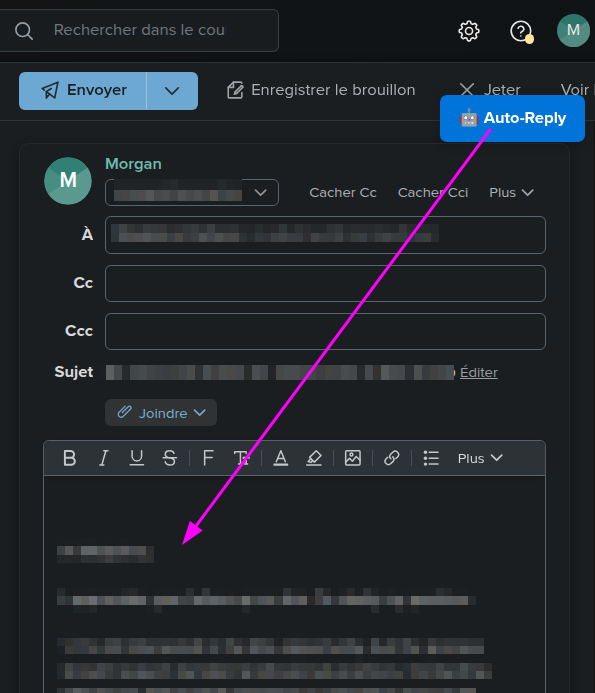
I've built user scripts for Fastmail Web UI to inject generated answers, see screenshot below.

A screenshot of the auto-reply button in Fastmail Web UI

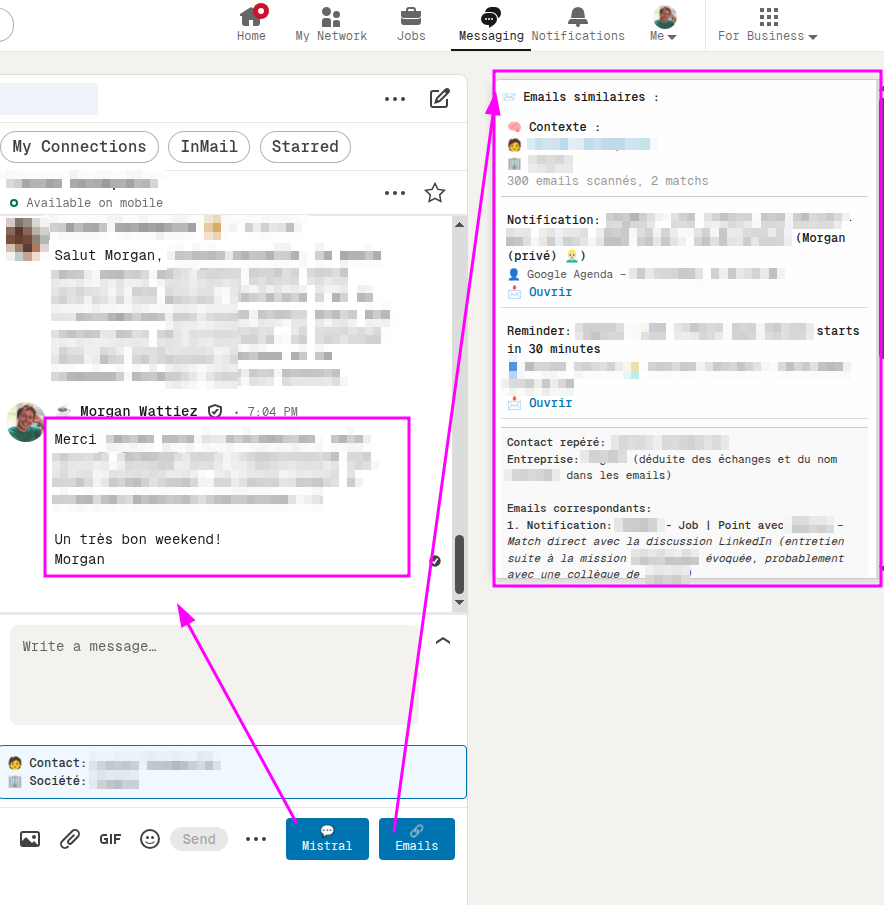
I've also built user scripts for LinkedIn Web UI to:

  1. Suggest replies for the current conversation, without automatically sending them.
  2. Display calendar events and emails conversations related to the contact/job I'm viewing.
A screenshot of the auto-reply / Emails buttons in LinkedIn Web UI

I automate other stuff too - monitoring, RSS, accounting - but that's not today's post

Boring digital things should be hands-off. Fun digital things should be hands-on. This also touches some of the ideas expressed in the 4-hour workweek book.

💁I consult on custom automation. My email is below.


💌 The best way to get in touch is via my email morgan at zoemp dot be. You can also follow me on the Fediverse / Mastodon at @sansguidon@mamot.fr. I speak (a lot) French, English and a bit of Dutch.

Zombiemerge

I do love code reviews but I'm convinced they're best done live — reviewed, merged, communicated immediately.

A few weeks ago I did submit changes through merge requests, and a few weeks later I had completely forgot about their implementation.

I context switched a few times since then....

Today the change was merged by the repository maintainers then a few colleagues were discussing one of its consequences. Only because I was in the same workspace, I did react on time.

My mistake was likely to not have communicated more proactively about the change, likely as I'm not the repository maintainer nor the release maintainer so I had no idea when the change would be merged.

Anyway, there are several such merge requests being queued. All recipes for future headaches.


Productivity monk

I have taken a few habits recently:

  • Inbox zero by bedtime. Unhandled mails go to TickTick.
  • Tasks default to next week. If they matter, they’ll wait.
  • One work task per day. If it drags, I commit or kill it.
  • Articles get bookmarked. Read later—or never. Doesn’t matter.
  • Tasks get automated. Or ignored.
  • Midnight is my hard stop. Usually...
  • Everything goes in TickTick.
  • No date = no task. No surprises.
  • Task and blog ideas are dumped into TickTick as notes, voice or text.
  • LLMs get a few hours. That’s it. And only for automation.
  • LinkedIn runs on auto-reply.
  • Same rules at home and work. One brain. Scripts everywhere.
  • I keep folders of tabs—Wednesday, Friday, Daily. I open them when it’s time. Not before.
  • I use browser userscripts to bend websites to my will. UX included.
  • Family runs on self-service. Automation takes care of the rest.
  • And a few things don’t change—only improve: Backups and monitoring for everything. Unit tests for all my scripts. And pipelines. Obviously.

This isn’t a system. It’s survival. Simplicity is the only thing that scales, especially with kids and ADHD.


Lazy coding done right

When performing a task, even if it's a one-off, I believe it's a mistake to approach it with a short-term vision. We might solve many problems just for one occasion, but that's the nature of any project; each one is unique and happens only once. Should we really ship it with a short-term vision and skip automation, documentation, and testing just because they require more effort? Should we be so lazy?

I believe being lazy can be a good thing, but we shouldn't be so lazy that we skip essential steps like testing, documentation, information processing and retention, automation, collaboration, asking questions, and improving processes. These efforts will surely pay off for our knowledge and efficiency, or if not for ours, then for the team's knowledge and efficiency, for maintainability, and to reduce tech debt and bus factor. Of course, that requires thinking like a chess player, calculating our moves, and doing some planning.

For example, during an infrastructure migration, we faced many integrations that needed testing from the ops side, yet we lacked internal QA expertise. We rushed to collaborate with others to gather information on testing their flows. Even though we didn't have time to write automated tests immediately, I documented all the information so we could use it for future monitoring and automation purposes.

Another instance is our workspace setups, which were initially painful, yet many developers accepted it. When I had to use their setup script, I found many outdated or irrelevant steps and undocumented instructions. I automated those steps and fixed the instructions. Now, newcomers recognize the value of this, and even people external to the project can set it up without prior knowledge, saving days of effort and enabling easier contributions.

When I have to do a task, even just once, I try to make a script and document it. If I have to do it more than once, I try to automate even more parts. Each time I return to a task I'm becoming too familiar with, I feel the urge to improve the process, document and automate it, make it configurable, flexible, shared, robust, and efficient. When performing repetitive operations, I script them, always. At least partially if not fully. If mistakes occur, the fixes are likely to be automated or documented.

When asking for help, I provide context, and when doing something useful, I share the news or update the docs so people can be aware and benefit from it. I often receive positive feedback for this approach, as people start to realize that automation is more efficient, forgiving, and less risky than repeating operations manually.

Sometimes it's more tempting and fun to spend two days automating something rather than spending an hour running an imperfect automation hundreds of times. You have to balance the pros and cons of fun versus efficiency, depending on your priorities. However, it's risky to automate something you don't fully understand. You need to acquire some level of expertise in a topic before embracing automation and contributing improvements. It's dangerous to automate something you don't know how to run, debug, or test manually.

LLMs can help automate tasks, but you should be able to code and debug without them. You need to perform a task fully without LLMs or scripting before attempting to script it. It's good practice to study the documentation, API, and man pages of the tools you use and learn to troubleshoot effectively.

I believe every second counts, and even if we're solving a unique problem for the first time, the knowledge gained is worth documenting. This way, we can extract a process or history from it, which can be helpful for us, our team, or anyone else if shared.
Writing

Today is international logic day, and I really want to read logicomix comic strip someone offered me for Christmas.

I realize as a logician that I can perfectly organize some stuff and as ADHD I feel completely stuck with some tasks yet to have my attention drained by completely unrelated events.

Often the fix or the way to disconnect from my mental paralysis is to write, walk, climb, talk, tell, draw or code.

It's a form of calm expression of self, an escape from news, emails, todo lists, code problems, mental load and daily stress for all the code and life bugs I can't unsee.

Like this blog where I write without caring if anyone is reading, and with no other purpose but the act of writing.

Mastodon